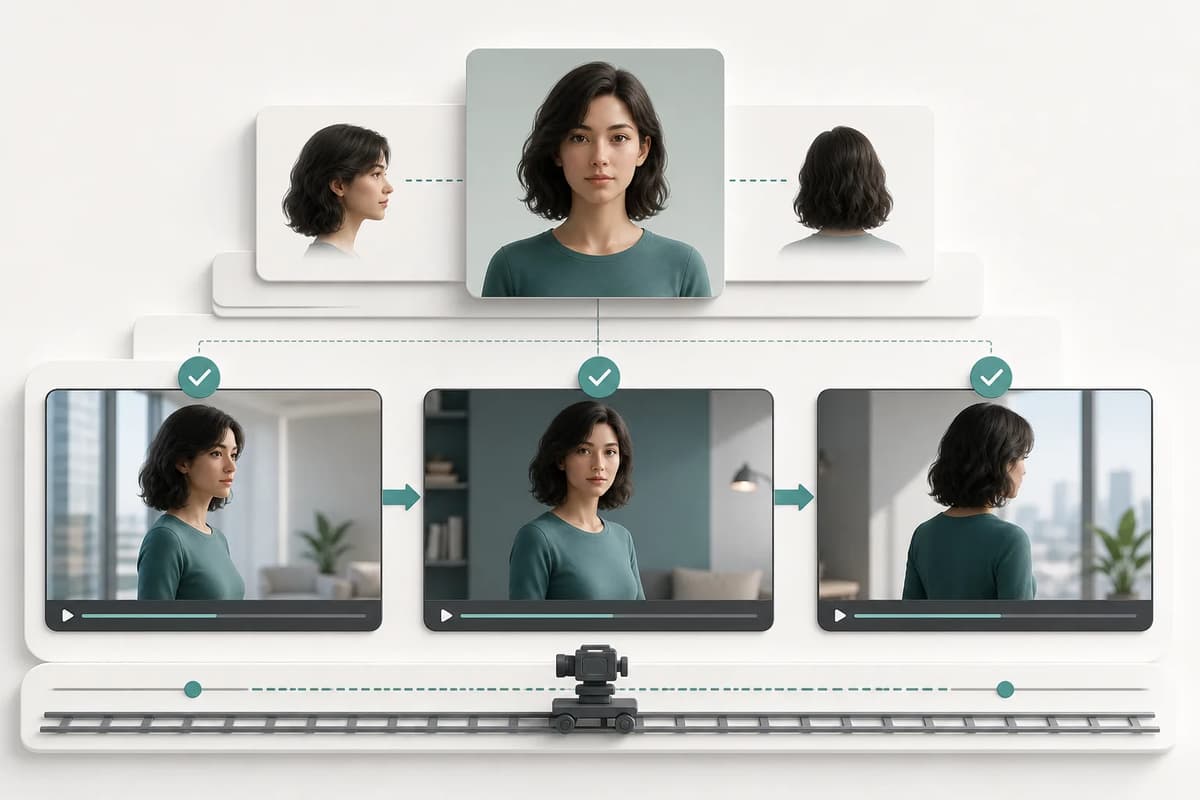
Character consistency in adult AI video depends on reducing simultaneous change. Use a clearly adult source with a readable face and limbs, select one compatible action, keep the camera restrained, begin with four seconds, and compare identity at the start, midpoint, and end. If the character changes, repair the source or simplify motion before increasing duration.
Start from an identity-safe image
Use a portrait or full-body image already approved for face, hair, adult age cues, build, hands, and clothing edges. A dramatic explicit image may be a weaker source than a clean mature portrait because occlusion and anatomy compete with identity. Keep a neutral character anchor available even when the animated source is more stylized.
| Source trait | Why it helps video | Failure when absent |
|---|---|---|
| Face visible | Gives every frame an identity anchor | Blur or face substitution |
| Hair silhouette clear | Preserves shape during motion | Changing length or color |
| Limbs readable | Supports joint trajectories | Extra limbs and broken hands |
| Background simple | Supports camera continuity | Pulsing or bending objects |
| Pose fits action | Reduces abrupt repositioning | Body snaps before motion begins |
| Adult status clear | Keeps the workflow unambiguous | Safety refusal or unacceptable output |
Create the base identity with Adult Character Creator when needed. The adult art consistency guide explains the neutral reference pack.
Match action to pose
A standing character can walk, dance, or shift weight. A seated character supports smaller gestures, torso movement, or a camera push. A close portrait should not be asked for complex full-body movement. Selecting an incompatible action forces the model to invent unseen anatomy and often replaces identity.
Use one action. The optional prompt can specify pace, environment, or camera, but it should not add another motion sequence. For explicit-only actions, entitlement should be checked before quote and run creation. Free users should see the lock rather than spend a trial on an invalid request.
Keep camera movement secondary
Identity is easier to preserve with a locked shot or slow push-in. An orbit reveals unseen angles and asks the model to reconstruct the face, body, and room. Handheld motion adds noise. Rapid cuts are outside a single focused clip.
If the action is strong, keep the camera steady. If the body movement is subtle, a gentle camera move can carry visual interest. Describe distance and direction: locked medium shot, slow front push-in, or gentle rightward track. The NSFW video prompt guide provides a compact formula.
Begin short and extend only after review
Four seconds exposes whether the face and hair survive movement. Review the first frame, one-second point, midpoint, and final frame. If identity is stable, six seconds may complete the action. Eight or ten seconds should be used only when longer pacing has a purpose.
Longer clips do not “give the model more time to understand.” They give the generation more time to drift. The adult video duration guide explains the cost and stability tradeoff.
Use real-person mode responsibly
When a source depicts a real person, a supported character-assets path can improve provider compatibility. It must be an explicit paid control, not silently enabled. If the source is detected as real and the control is off, the interface should open it and explain the requirement. A free user should receive the corresponding paid-feature offer.
This mechanism does not create consent. Obtain specific permission for adult animation, avoid age ambiguity, and never use leaked or private media. Keep consent records separate from prompts and public metadata. Read the real-person consent guide.
Perform frame-by-frame identity review
Use a simple score at four points:
- Face geometry and recognizable features.
- Hair color, length, and silhouette.
- Body build and adult age cues.
- Clothing and signature accessories.
- Hands and limb count.
- Background anchors and camera direction.
Mark each stable, questionable, or replaced. A questionable midpoint can become a severe final-frame failure. Do not use a failed final frame as the source for continuation.
Continue from a clean end
If the clip will be extended, choose one whose last frame is sharp and compositionally stable. Preserve the same people, room, light, and camera. Describe one next beat. The output remains a separate clip, with optional generated audio, and may require editing before publication.
The adult video continuation guide provides a seam checklist. Do not extend a clip merely to hide a bad ending; regenerate the earlier motion from a better source.
Maintain a practical record
Save the source image, selected action, duration, optional prompt, real-person setting, quote, and approved output. Media History should retain the artifact. Active-run recovery should preserve the same idempotency key across refresh so a frontend restart does not create a second provider task or charge.
Do not log source URLs or private prompts in analytics. Aggregate app, duration, and content-level enums are enough for product measurement. Keep identity and consent details in the project’s private records.
Final takeaway
Consistent adult AI video is a constraint problem: clean source, one action, restrained camera, short duration, explicit real-person handling, and frame-by-frame review. Fix instability at the source or motion level before asking for more seconds. A short clip that preserves identity is the right foundation for continuation and editing.
When two clips both pass, prefer the one with a cleaner ending and simpler motion path. It will be easier to continue, crop, or place in a larger edit. Keep failed runs out of the reference chain even when a single frame looks good; temporal identity is the requirement, not the best isolated screenshot.