An NSFW AI generator input should answer four questions before creation begins: which clearly adult subject is involved, what authorized source exists, what single output is needed, and which details must remain stable. Choose text, image, or video because the workflow needs that evidence—not because a larger input feels more powerful. The smallest authorized input that clearly defines the task is usually easier to review and safer to handle.
Choose the workflow from the output
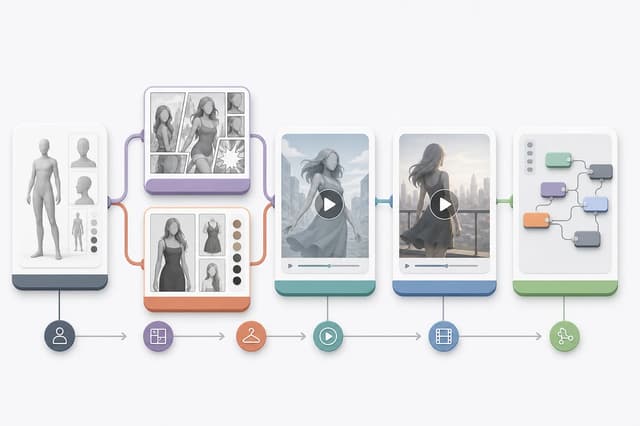
Start with the result, then work backward to the input. A character portrait, comic scene, edited image, motion clip, edited video, and continuation clip require different evidence. Sending the same source into every workflow creates confusion about what the system should preserve.
| Desired output | Minimum useful input | Best starting point |
|---|---|---|
| Original adult character | Trait choices; optional authorized portrait | Adult Character Creator |
| One adult comic scene | Clear character image and scene choice | Adult Comic Generator |
| Controlled image change | One editable image and one change | NSFW AI Image Editor |
| Preset-led makeover | Adult portrait and one makeover direction | Adult Makeover |
| New short motion clip | One motion-ready adult image | NSFW Image to Video |
| Review or change a clip | One authorized short video and edit decision | NSFW AI Video Editor |
| Add the next story beat | Stable ending clip and continuation direction | Adult Video Continuation |
If two workflows seem equally suitable, identify whether the source is a still or a clip and whether the task creates new material or changes existing material. The adult AI workflow guide provides the complete generator-versus-editor decision path.
Confirm age, authorization, and consent
Every depicted person must be clearly adult. Do not use age-ambiguous language, images, costumes, settings, or character framing. Do not rely on a later prompt to establish adulthood when the source is uncertain. If age cannot be confirmed, the input is not suitable.
Use only material you created, licensed, or have permission to transform. A public image is not automatically authorized. A normal portrait release is not automatically permission for an adult transformation. For a real person, consent should cover the source, intended adult result, level of explicitness, audience, commercial context, and storage expectations.
Original fictional characters avoid some likeness concerns, but they still need clear adult presentation. Existing fictional characters, brands, artwork, and model assets can carry separate rights. Review the adult content safety guide and the real-person consent guide before using sensitive references.
Minimize the source and private data
Upload only what the task needs. A single image is preferable to an entire album when one portrait defines the character. A short clip is preferable to a long private recording when only the ending frame is needed. Remove unrelated people, screens, documents, notifications, addresses, and private surroundings when doing so is authorized and does not damage the task.
Use a neutral filename. Do not put a legal name, email, phone number, account ID, or consent record into a filename or prompt. Inspect metadata such as location, device details, creation time, comments, or track names, and create a sanitized working copy when those fields are unnecessary.
Keep proof of permission outside the creative prompt and outside public output. The upload privacy guide covers file minimization and metadata review. Read the applicable Flowith Privacy Policy and Flowith Terms of Service before submitting sensitive material.
Describe one stable task
A good input package separates preserved facts from requested changes. For an image edit, preserve identity, pose, and background while changing one wardrobe or lighting layer. For image-to-video, preserve identity, setting, and camera direction while adding one action. For continuation, preserve the ending state and introduce one next beat.
Use an optional prompt only for details the controls do not already express. Avoid repeating the same instruction in conflicting forms. Do not request several actions, styles, rooms, cameras, and identities in one attempt. A narrow first result gives you a baseline that can be reviewed and safely used in a later step.
Write a small task brief:
- Adult subject: who or what clearly adult character is depicted.
- Authorization: why the source can be used for this transformation.
- Output: the one image, comic scene, clip, edit, or continuation needed.
- Preserve: identity, pose, clothing, setting, camera, or other fixed details.
- Change: one observable creative decision.
- Finish: the state that marks a successful result.
Review input readiness before creating
Use this final gate:
- The subject is clearly adult and the content request is permitted.
- Every source is authorized, and real-person consent is specific to adult use.
- The chosen Tool matches the desired output and source type.
- The minimum necessary file has enough visual evidence for the task.
- Private metadata and unrelated visible information have been removed.
- One change and the details to preserve are written clearly.
- The optional prompt does not contain personal records or try to bypass controls.
- You know how the first result will be compared with the source.
After generation, review the result before moving it into another workflow. Compare adult status, identity, anatomy, background, text, and any new private or identifying detail. Do not treat an attractive result as automatically correct. If it fails the original task, return to the clean source and narrow the instruction rather than building on the failure.
Keep a short rejection note when an input does not pass. Record whether the blocker was age clarity, missing permission, poor visual evidence, excessive private data, the wrong source type, or an output request that combines too many changes. A rejection note prevents the same unsuitable file from returning in another workflow and makes the next source choice concrete. It should describe the category of problem without copying personal or sensitive details.
The Flowith Adult AI Hub remains the broad starting point. This checklist is complete when the selected input is authorized, minimal, readable, and matched to exactly one next action.